Deliverability + Domains — CleverlyBox · Inbox placement isn't luck. It's wiring.
Inbox deliverability, where it matters

Inbox placement isn’t luck. It’s wiring.

Custom sending domains with SPF, DKIM, and DMARC. Tracking domains with HTTPS-by-default via Let's Encrypt. FBL handlers for AOL, Yahoo, and Microsoft. Bounce processors that classify soft / hard / OOO. IP warmup webhooks. Auto-pause when bounce rate spikes. The entire deliverability stack — not a marketing claim, an actual feature surface.
SPF Authenticate
DKIM Sign
DMARC Protect
HTTPS Secure
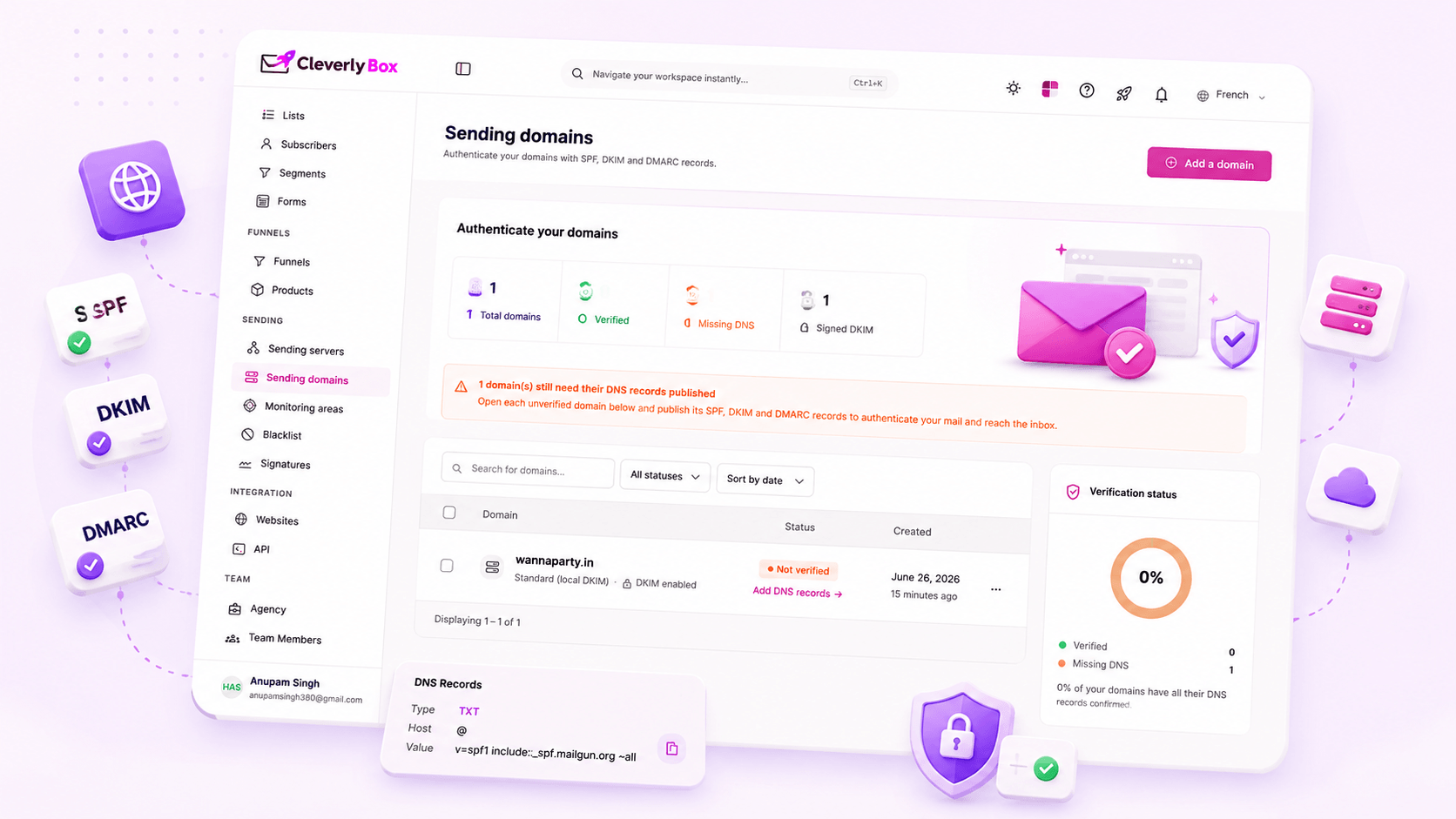
Deliverability overview

Deliverability is the work. Most platforms abstract it away — and that’s the problem.

We surface the signals that matter most. Diagnose issues before they cost you replies. And give you complete control over your infrastructure, content, and sending reputation.

No DNS visibility on mainstream ESPs

Mailchimp / Klaviyo configure SPF / DKIM in the background. You never see the records. When deliverability tanks, you have nothing to inspect — just a "we're looking into it" support ticket that closes in 4 days.

Sender reputation roulette

You're on a shared IP with hundreds of other senders. One spammer in the pool tanks the reputation. Your perfectly-permissioned newsletter lands in spam — and you have no idea it was someone else's send that did it.

No FBL processing visibility

When AOL or Yahoo subscribers hit "Spam," the FBL fires. On most ESPs, you never see the rate. You never see who complained. The reputation degrades silently — and your future sends suffer.

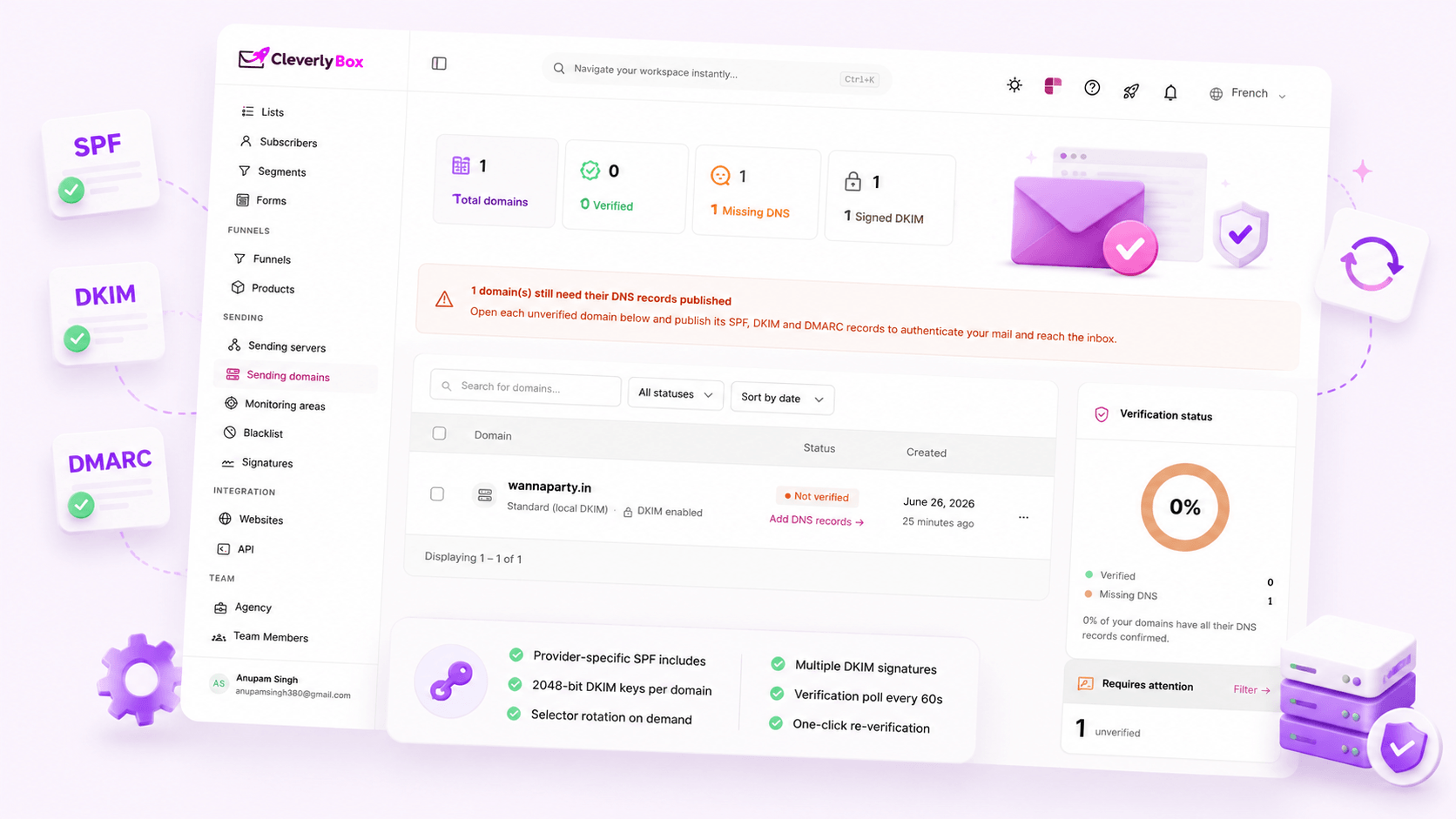
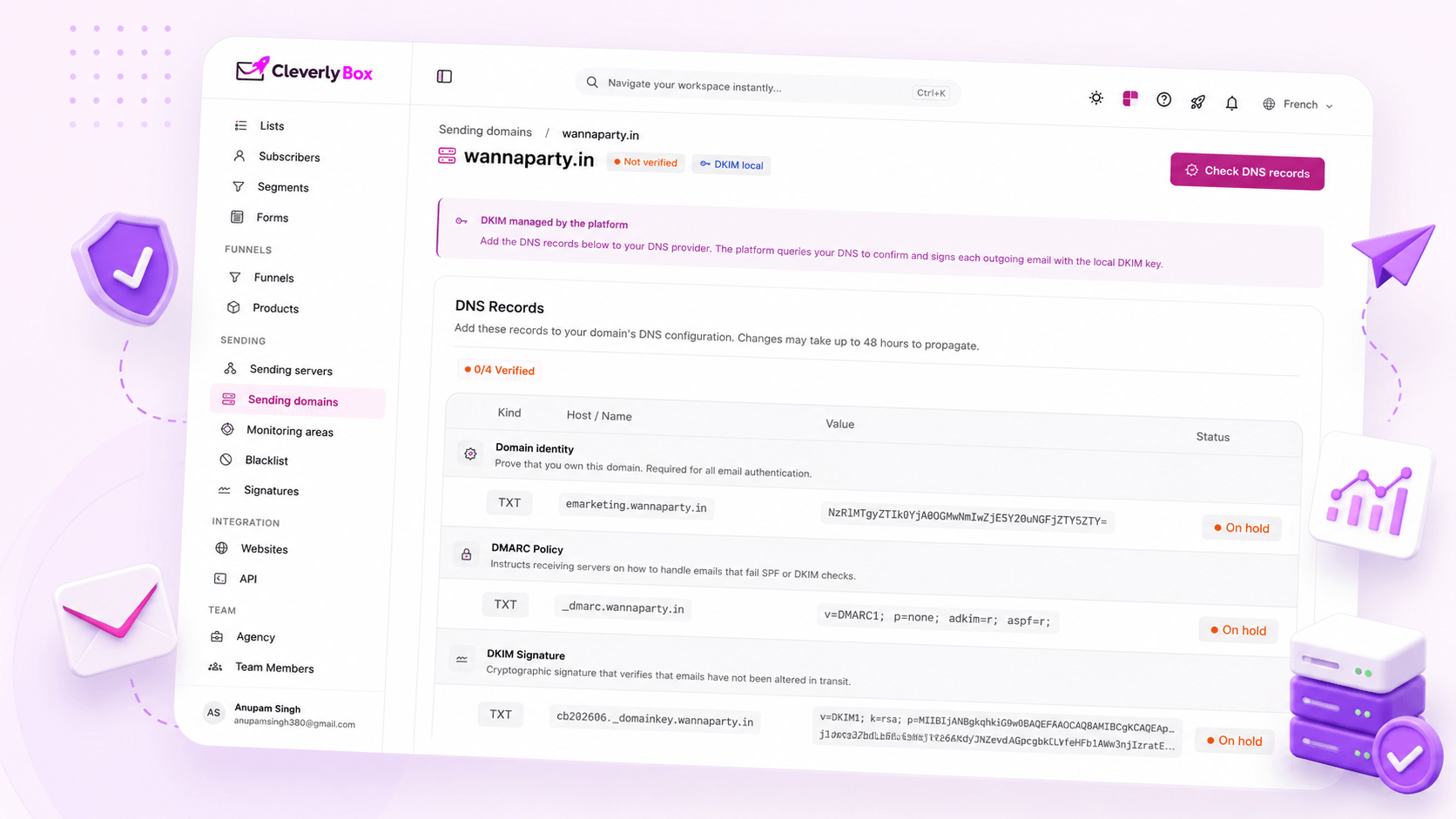
Custom sending domain

Send from your domain.
Not a “via mailgun.com” tag.

Add your domain (mail.acme.com, send.acme.com — your choice). The platform generates the exact DNS records you need to copy into your DNS provider's panel. Cloudflare, Route 53, GoDaddy paste, save, verify in CleverlyBox. Your emails now show up as "from Acme" instead of "from Acme via mailgun.net."

  • Subdomain or root domain — your call
  • SPF record auto-generated for your provider
  • DKIM key generated, public-key TXT record provided
  • Custom Return-Path domain for bounce processing
  • DNS verification flow — green checkmark per record
SPF + DKIM auto-generation

You don’t write the records.
The platform generates them.

SPF and DKIM are easy to get wrong by hand wrong include, wrong selector, wrong key length. CleverlyBox generates the exact records for the sending provider you've connected (SES, SendGrid, Mailgun, etc.) and rotates DKIM keys on demand. Paste the values, hit Verify, ship.

  • Provider-specific SPF includes — SES vs SendGrid vs Mailgun
  • 2048-bit DKIM keys per domain
  • Selector rotation — generate new keys without breaking old ones
  • Multiple DKIM signatures (one per provider) for failover-ready setups
  • Verification poll runs every 60 seconds until green
  • One-click re-verification when DNS propagates
DMARC

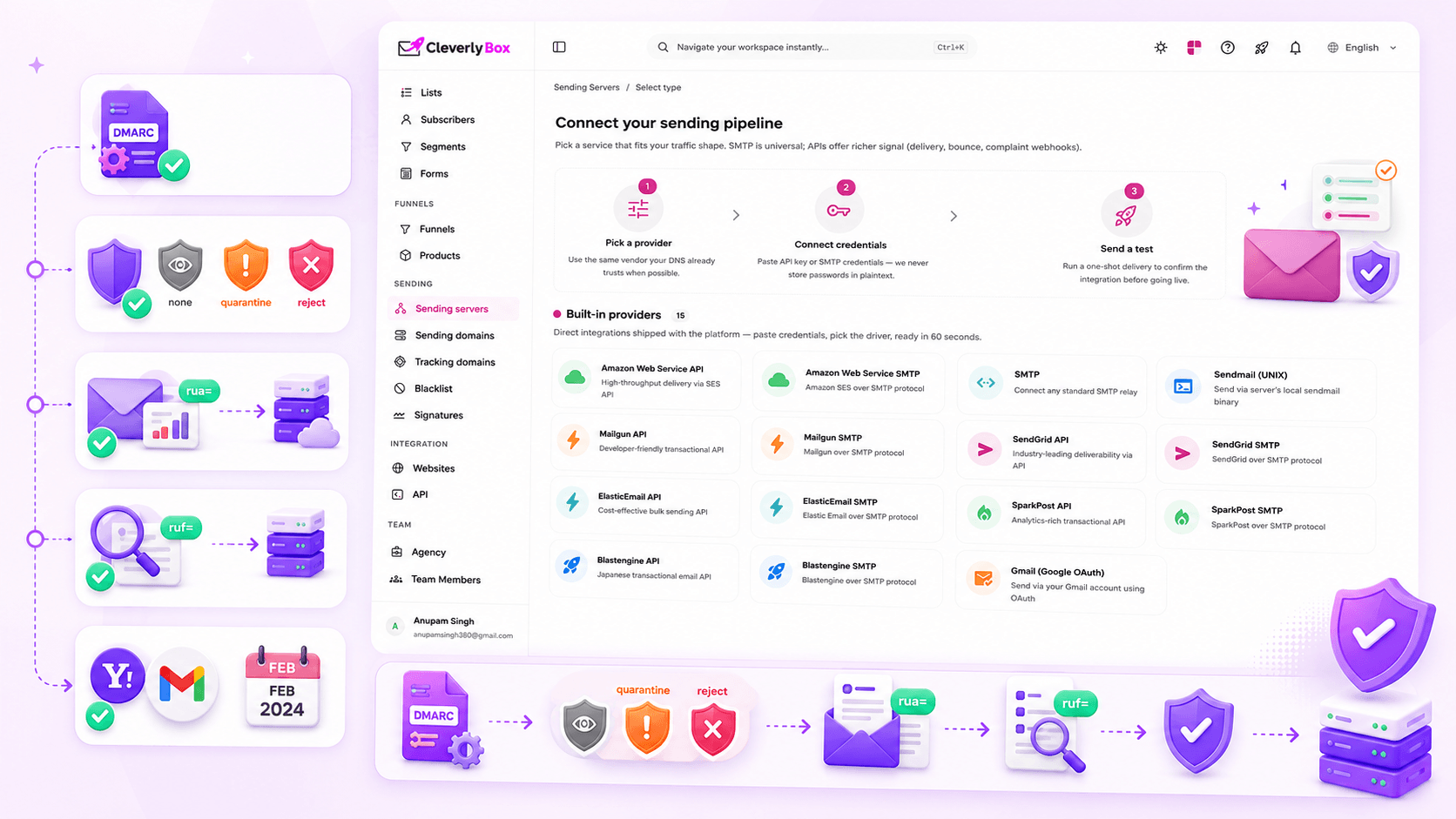
Tell receiving servers what to do with your emails when SPF/DKIM fails.

DMARC is the policy layer above SPF and DKIM. It tells Gmail, Yahoo, and Outlook: "if mail claiming to be from acme.com fails alignment checks, here's what to do — quarantine, reject, or just report it to me." Without DMARC, anyone can spoof your domain. With DMARC + p=quarantine, you've shut the door on most domain spoofing attacks.

  • Auto-generated DMARC record with sensible defaults
  • Policy choices: none (monitoring), quarantine, reject
  • Aggregate reports (rua=) routed to your endpoint or our parser
  • Forensic reports (ruf=) supported for advanced setups
  • Required for Yahoo / Gmail bulk senders since Feb 2024
Tracking domain HTTPS

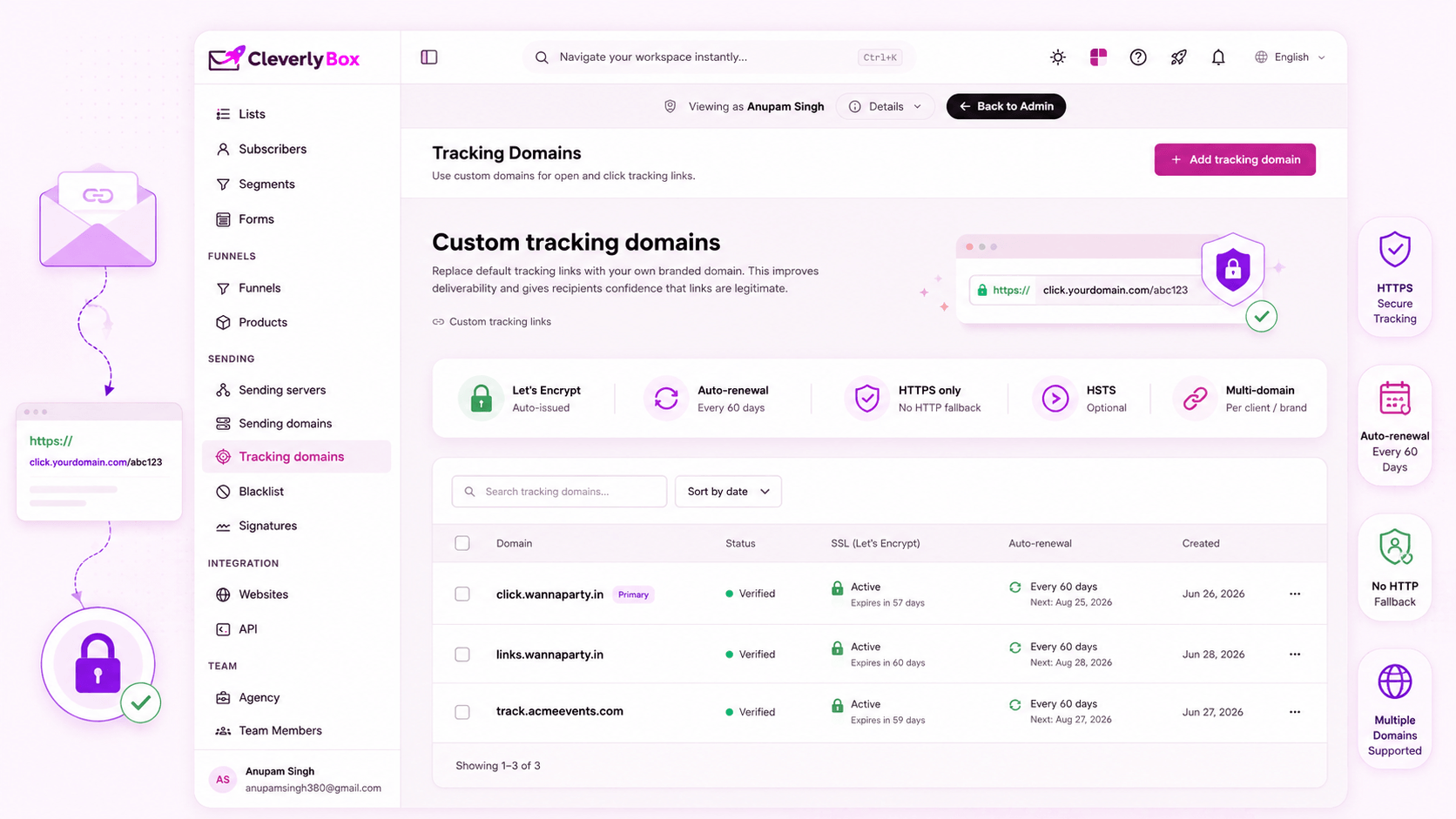
HTTPS-by-default tracking. Let's Encrypt cert auto-issued.

Click-tracking links in your emails go through a tracking domain clicks.acme.com instead of cleverlybox.com/c/abc123. CleverlyBox issues a Let's Encrypt cert for your tracking domain automatically and rotates it on the standard 90-day schedule. No HTTP-fallback. No "your connection is not private" warnings in Gmail's preview pane.

  • Custom tracking domain — click.yourdomain.com
  • Let's Encrypt cert auto-issued on domain verification
  • Auto-renewal every 60 days (before the 90-day expiry)
  • HTTPS-only redirect — no http:// fallback
  • HSTS header optional
  • Multiple tracking domains supported (per-client / per-brand)
Post-send warmup

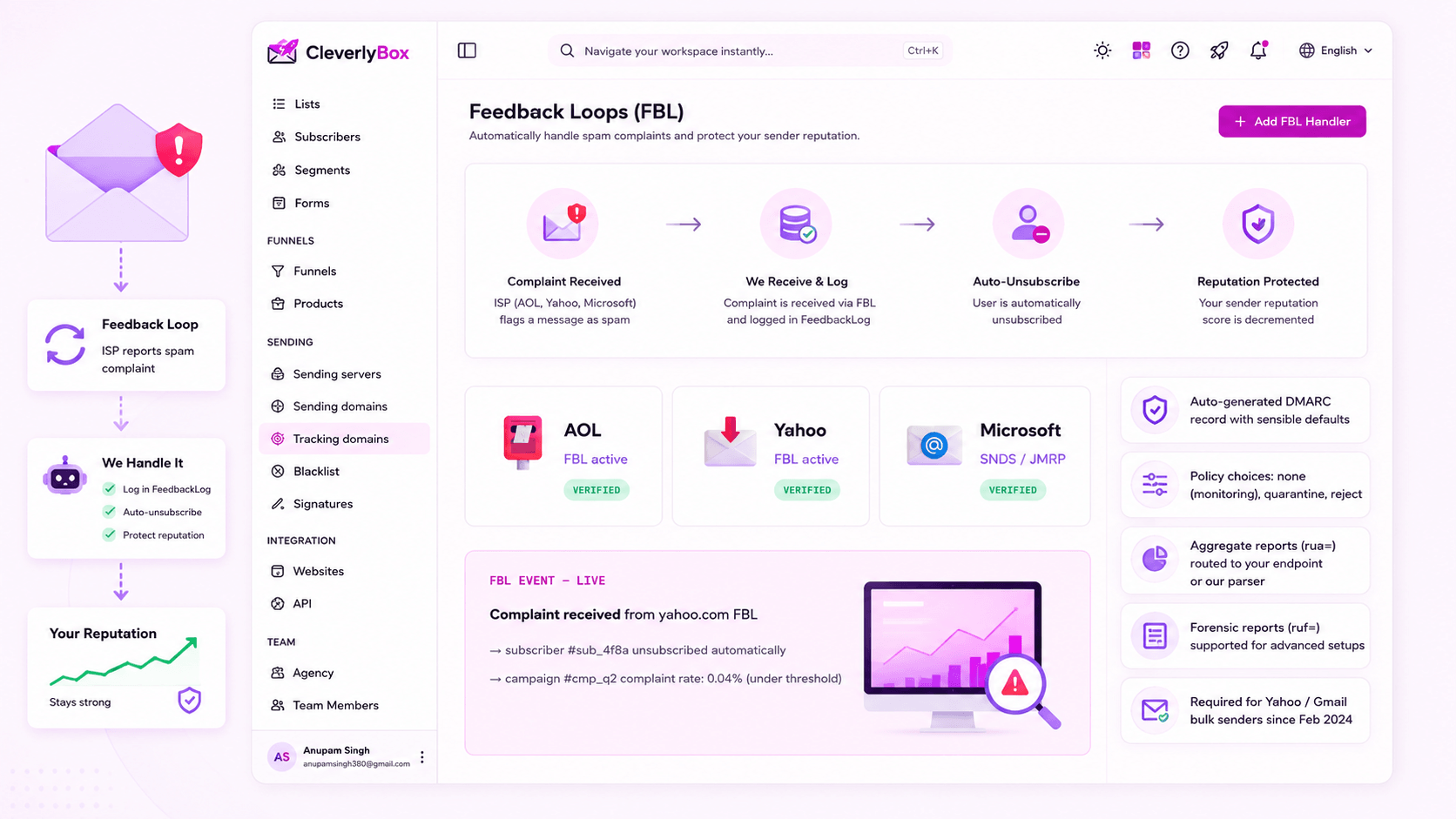
When AOL, Yahoo, or Microsoft says “spam”, we fix it instantly.

Feedback Loops (FBL) are the industry mechanism by which major ISPs report user-flagged spam complaints back to the sender. CleverlyBox runs FBL handlers for AOL, Yahoo, and Microsoft — the moment a recipient hits "Spam," we receive the complaint, log it to FeedbackLog, auto-unsubscribe the user, and decrement your sender reputation in our internal scoring.

  • AOL FBL handler — registered with AOL Postmaster
  • Yahoo FBL handler — same family of receivers
  • Microsoft FBL (SNDS / JMRP) integration for Outlook / Hotmail
  • Auto-unsubscribe on complaint — protects your future reputation
  • FeedbackLog records every complaint with subscriber + campaign
  • Complaint rate dashboard — track FBL hits per campaign
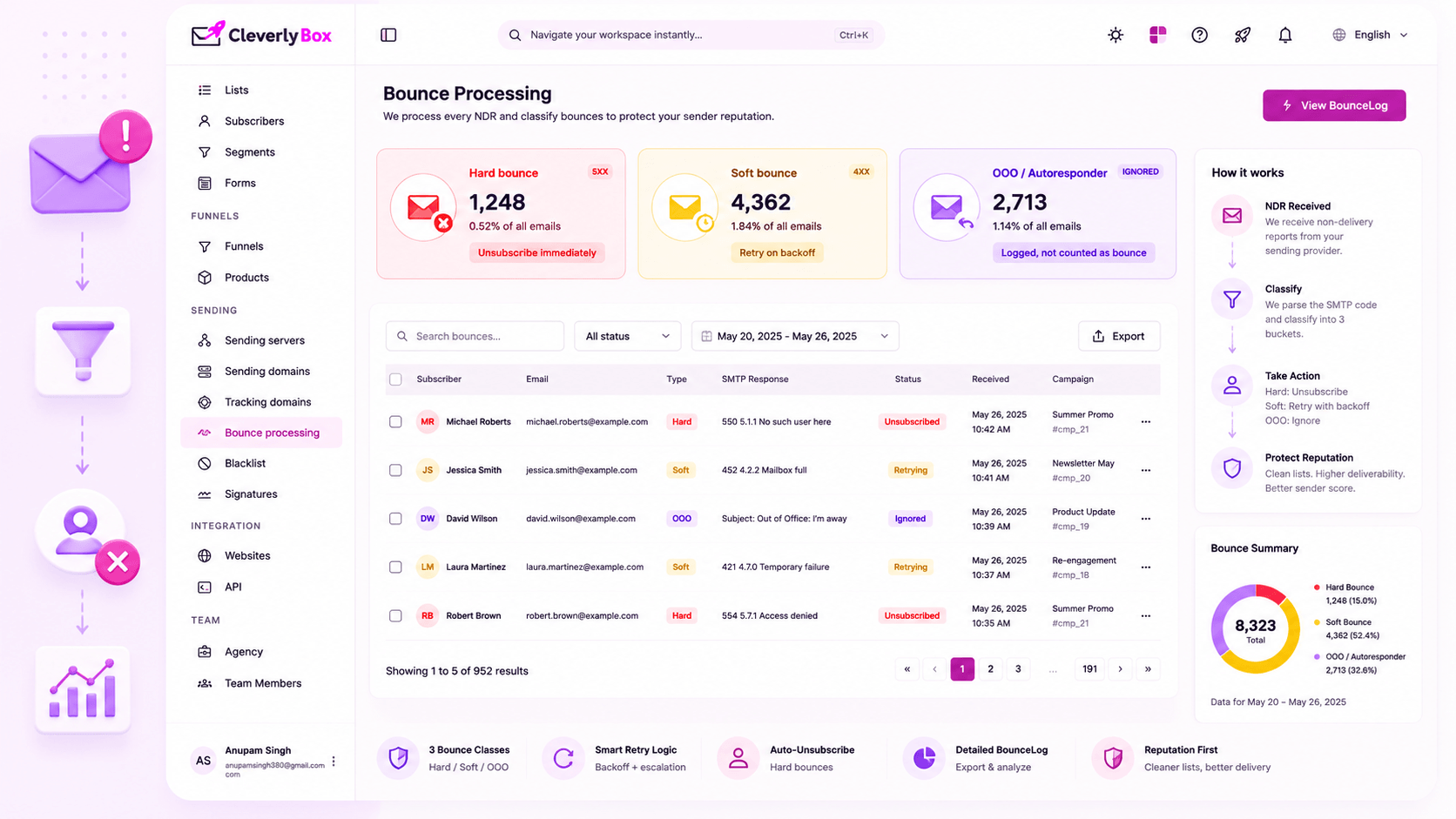
Bounce processing

Soft. Hard. Out-of-office. Three classes, three responses.

The bounce handler ingests every NDR (non-delivery report) from your sending provider, parses the SMTP response code, and classifies the bounce into one of three buckets. Hard bounces unsubscribe immediately a permanent failure. Soft bounces retry on a backoff schedule. OOO replies are detected and ignored, never confused with real bounces.

  • Hard bounce — permanent failure (5xx). Unsubscribe immediately.
  • Soft bounce — temporary failure (4xx, mailbox full, throttled). Retry on backoff.
  • OOO / autoresponder — detected by header / body pattern. Logged but not counted as bounce.
  • Per-subscriber bounce streak — 3 soft bounces in a row → escalate to hard
  • Bounce reason captured from the SMTP response (mailbox-full, blacklisted, blocked, etc.)
  • BounceLog table queryable + exportable
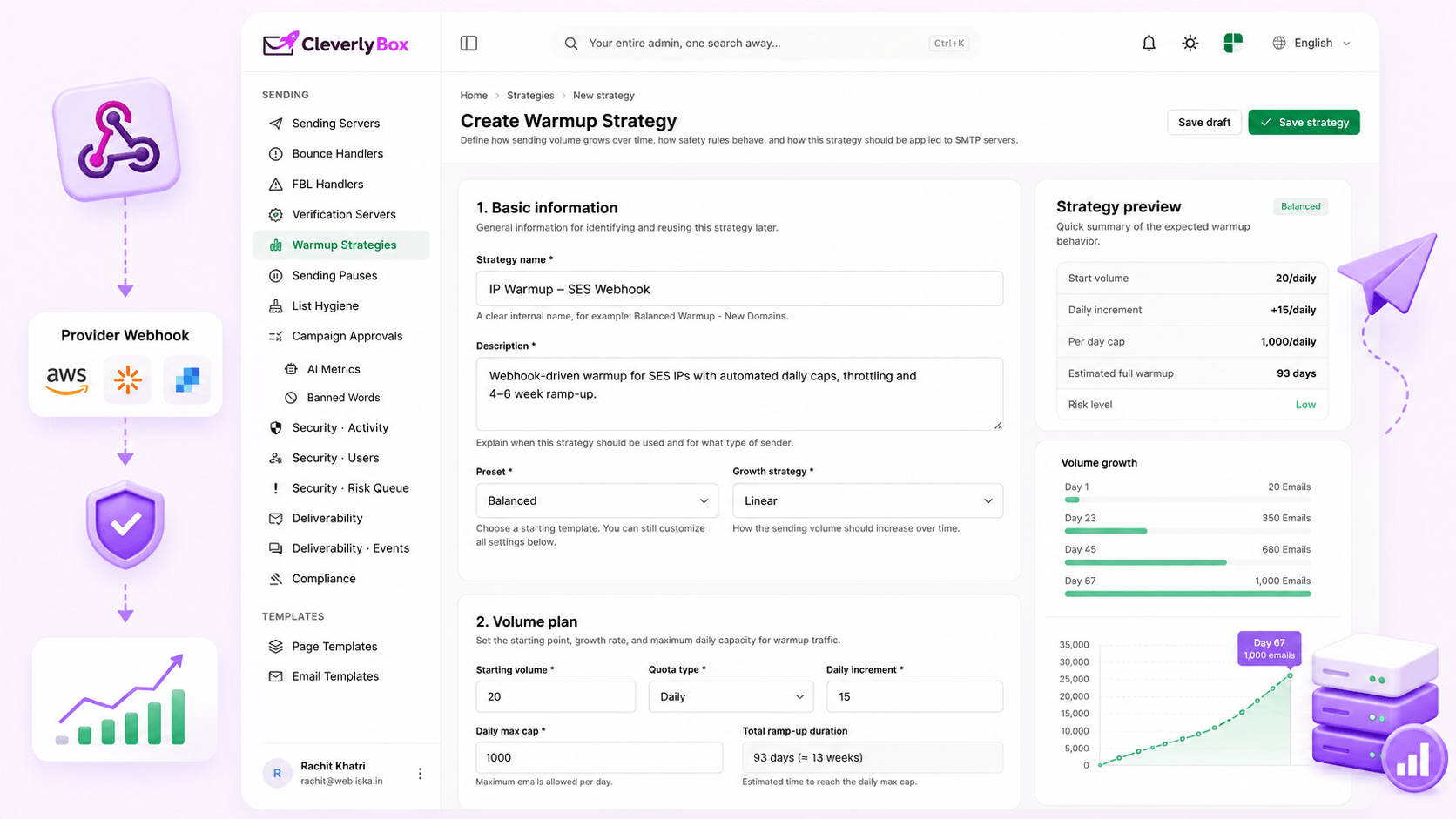
IP warmup

Webhook integration with your provider's warmup schedule.

New IP from SES or SendGrid? You can't blast 100,000 emails on day one ISPs treat that as a spam signature. CleverlyBox integrates with your provider's IP warmup schedule via webhook: it tracks your daily volume cap, gates outbound sends to stay within it, and ramps up over the standard 4–6 week schedule.

  • Webhook integration with SES, SendGrid, Mailgun warmup schedules
  • Daily cap auto-enforced based on warmup phase
  • Send queue throttles and queues overflow for the next day
  • Manual override for experienced senders who know their reputation
  • Per-IP tracking when you have multiple IPs in rotation
  • Visualization: where you are in the warmup curve
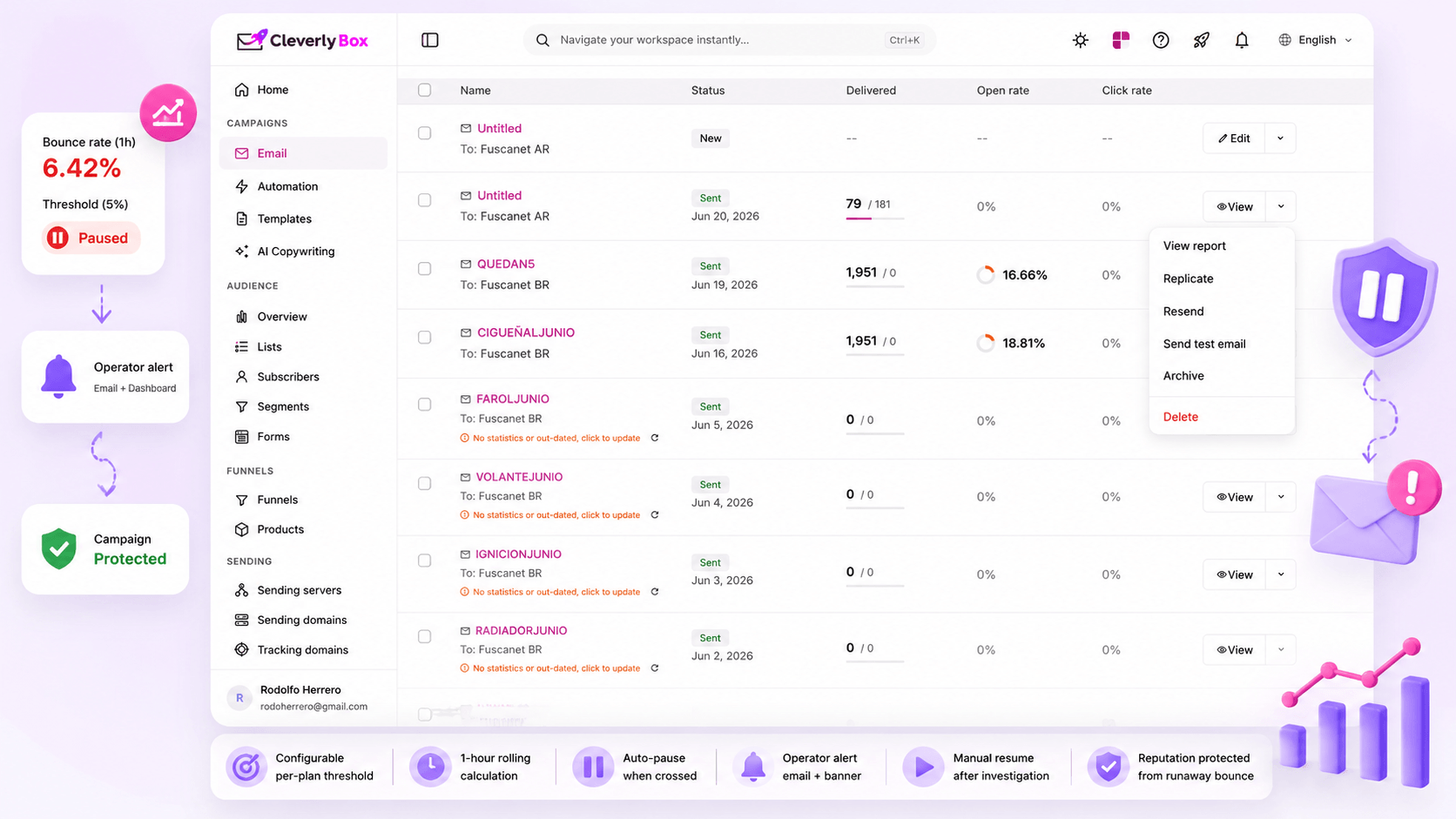
Bounce-rate threshold + auto-pause

When bounce rate spikes, the platform pauses you. Before you’re blocked.

Industry standard is to keep bounce rate under 5% (Gmail and Microsoft start penalizing above 2%). CleverlyBox sets a per-plan threshold and monitors rolling bounce rate during a send. Cross the threshold mid-campaign? The send pauses automatically — saving your reputation before the ISP blocks you outright. Operator gets an alert to investigate.

  • Per-plan bounce threshold (configurable on Pro / Agency)
  • Rolling 1-hour bounce rate calculation
  • Auto-pause when threshold is crossed mid-send
  • Operator alert via email + dashboard banner
  • Manual resume once you've investigated
  • Saves the campaign — and your domain reputation — from a runaway bounce
Setup walkthrough

5 steps from zero to inboxing

Here's the end-to-end setup, in order. From "I just bought CleverlyBox" to "my first campaign is hitting Gmail's primary tab" usually takes 30–90 minutes — most of which is waiting for DNS to propagate.

01

Connect your sending provider

Pick from 14 supported providers — SES, SendGrid, Mailgun, SparkPost, etc. Paste API key (or SMTP credentials). Provider is now ready to relay outbound mail.

02

Add your sending domain

mail.acme.com or send.acme.com — your call. Platform generates SPF, DKIM, Return-Path, DMARC records. You'll see them in the DNS panel.

03

Paste DNS records

Open Cloudflare / Route 53 / GoDaddy. Paste the four records. Save. DNS propagates in 5–60 minutes — usually closer to 5.

04

Add tracking domain

click.acme.com or links.acme.com. CNAME record points at our tracking endpoint. Let's Encrypt cert auto-issues within minutes of DNS verification.

05

Send a test campaign

Send to your own Gmail / Yahoo / Outlook addresses. Check headers — you should see SPF=PASS, DKIM=PASS, DMARC=PASS. Tracking links should be HTTPS. If yes — you're inboxing. Now scale.

FAQ

Questions about DNS, FBL, bounces, and warmup

CleverlyBox is BYO sending provider — you connect your own AWS SES, SendGrid, Mailgun, etc. account. You're sending through their IPs (which can be shared or dedicated, depending on your provider plan). We don't run shared sending IPs ourselves. This is intentional — it keeps your sender reputation isolated from every other CleverlyBox customer. Your reputation is tied to your provider account, not ours.

Three checks. (1) The platform's verification dashboard polls your DNS every 60 seconds and shows green checkmarks when records resolve. (2) Send a test email to a Gmail / Yahoo / Outlook address you own and inspect the headers — you'll see SPF=PASS, DKIM=PASS, DMARC=PASS. (3) For DMARC specifically, you'll start seeing aggregate reports (RUA) within 24–48 hours from major receivers, summarizing pass/fail rates.

As of February 2024, yes — Yahoo and Gmail require DMARC for bulk senders (5,000+ messages/day). Microsoft is on the same trajectory. Even ignoring the requirement, DMARC is the policy layer that lets receivers actually do something with SPF/DKIM failures. Without DMARC, a failed SPF check is just a soft signal. With DMARC p=quarantine, it's a junk-folder vote.

Auto-pause. The campaign stops mid-send. You get a dashboard banner + email alert. Most common causes: (1) old / stale list — run pre-send verification and clean it. (2) Bad import — recently uploaded a CSV that hadn't been verified. (3) Reputation hit — your domain or IP is in a temporary block. Investigate, fix, click resume. The pause prevents a bad send from torching your reputation across every ISP.

Three reasons. (1) Some Gmail mobile clients show a "your connection is not private" warning on http:// click-through, killing CTR. (2) Modern browsers increasingly mark http:// pages as "Not Secure" — bad for brand trust. (3) Mixed-content warnings on landing pages with https:// origins fail when click-through is http://. HTTPS-by-default eliminates all three. Let's Encrypt makes it free; we automate the issue + renewal.

The standard warmup is 4–6 weeks for a new IP from cold. CleverlyBox enforces the daily caps via webhook integration with your provider. If you're moving from an existing warm IP (e.g., switching from another ESP), you may not need full warmup — but reputation doesn't transfer perfectly between platforms. We recommend a shortened 1–2 week warmup even when migrating, to let receivers re-recognize you under the new sending pattern.
Ready to get inboxing?

Stop hoping you’ll inbox. Wire it correctly.

Land more emails, protect your domain, and build sending infrastructure that scales.