Automation Workflows — 8 Triggers · 4 Actions · CleverlyBox
Automation built for agencies

Visual workflows with
8 real-world triggers

Build smart automations that react, route, and respond — across your stack. No code. No chaos. Just results.

8 Real-world triggers
4 Powerful actions
Possibilities
$0 Per extra workflow
8 Triggers

Start with what happens.

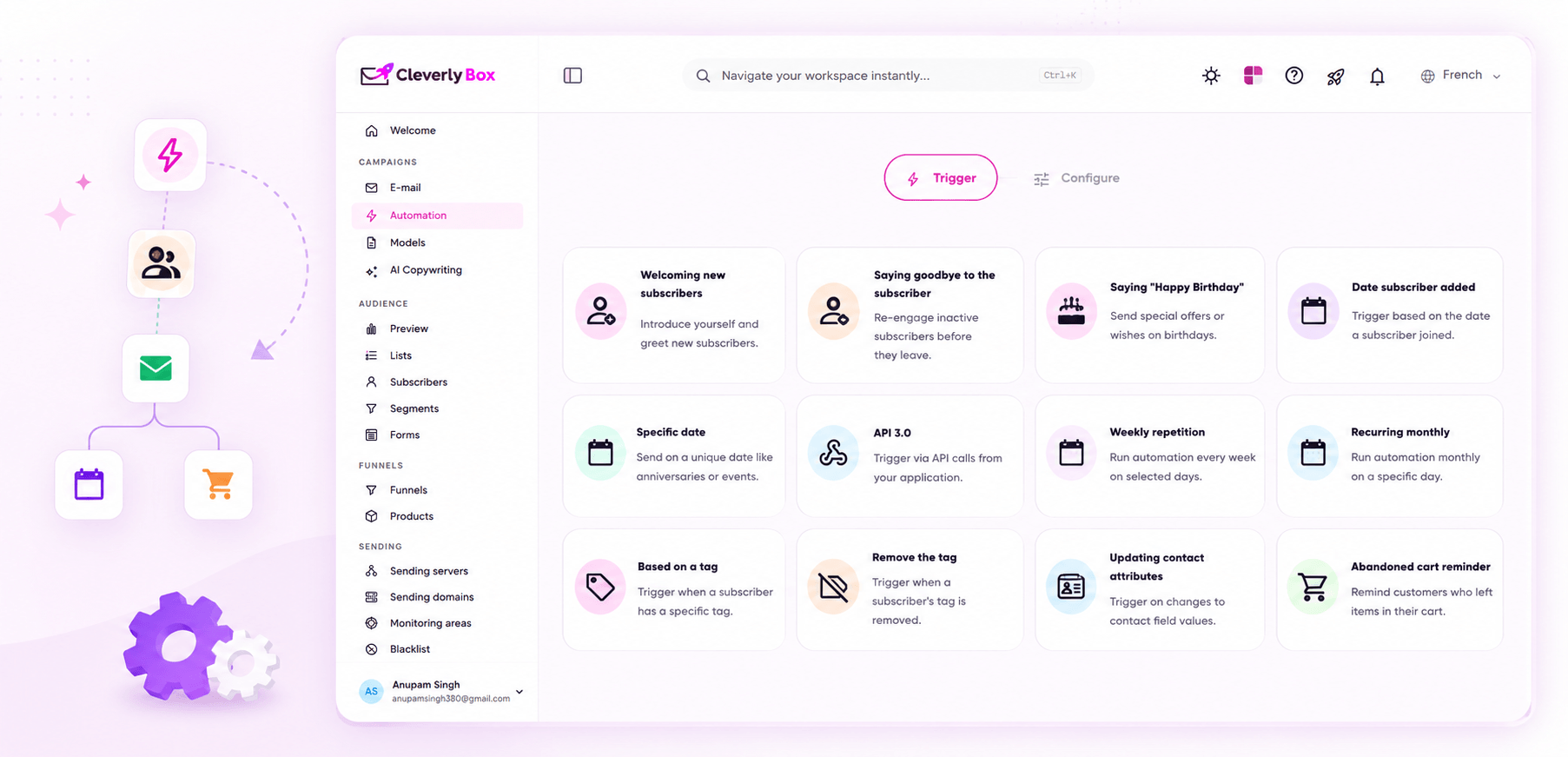
No "trigger marketplace" with 400 unmaintained third-party integrations. Eight triggers that cover the actual lifecycle moments your subscribers go through — and one (API webhook) that connects to anything.

01. Welcome new subscriber

Fire when a new subscriber joins a list. The canonical onboarding sequence. Use it for: welcome series, lead-magnet delivery, free-trial activation, list-segmentation onboarding.

02. Say goodbye to subscriber

Fire when a subscriber unsubscribes or is removed. Use it for: exit surveys, win-back attempts, GDPR data-deletion confirmations, churn-reason capture.

03. Birthday

Fire on a subscriber's birth date (custom field). Annual gift coupon, age-gated promotions, "you've been with us X years" messaging.

04. Subscription anniversary

Fire on the anniversary of subscription. Milestone messaging, loyalty rewards, "thanks for being here for X years," tier upgrades for long-tenure subscribers.

05. Specific date

Fire on a fixed date — Black Friday, product launch day, conference event, holiday promotion. Schedule once, runs once. The set-it-and-forget-it pre-launch trigger.

06. API webhook

Fire from any external system that can send a POST. Stripe payment, Shopify order, Calendly booking, your own product event. The escape hatch — covers everything the other 7 don't.

07. Weekly recurring

Fire every Monday at 9am. Or every Friday at 4pm. Newsletter cadence, weekly digests, "here's what's new this week," weekly check-ins for subscriber engagement.

08. Monthly recurring

Fire on the 1st of every month. Or the 15th. Monthly statements, recurring billing reminders, monthly digests, retention check-ins.

Actions that move the needle

4 actions. That's all you need.

Trigger it. Segment it. Send it. Power it. These actions help you launch, engage, and convert — automatically.

Send Email

Send an email. Pick a campaign, a sending pool, a from-name. Personalisation tokens supported. Spintax variations applied per recipient.

Wait

Pause the workflow for a duration minutes, hours, days, weeks. The pacing knob. Use it to space sends, batch overnight, hold for time-of-day windows.

Evaluate

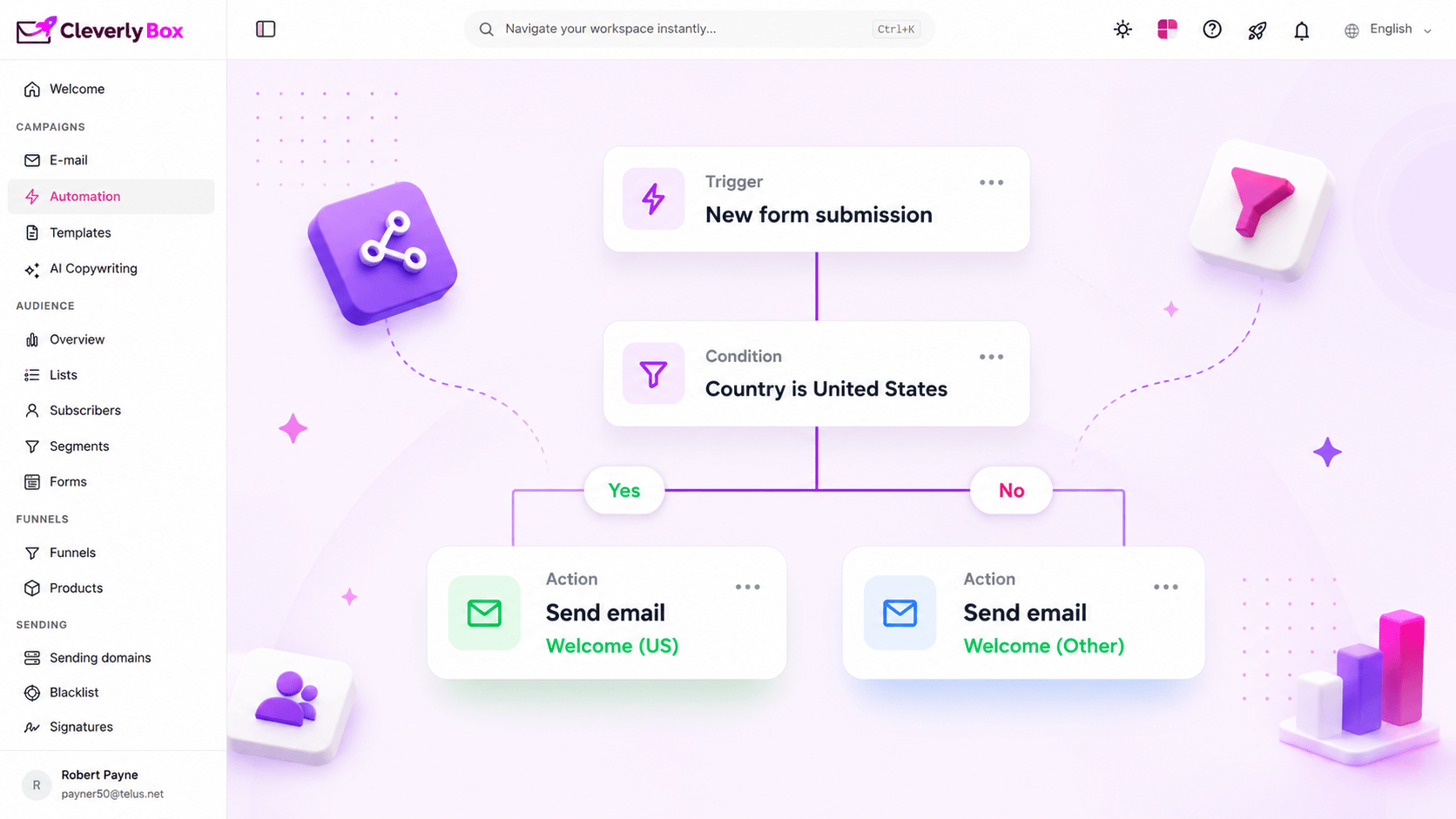
Branch on subscriber state. Did they open? Did they click? Did a custom field change? Did N days pass since last activity? The conditional logic primitive.

Operate

Modify subscriber data mid-flow. Add a tag, set a custom field, move them to another list, increment a counter. The state-mutation primitive.

Smart branching

Evaluate any condition.
Branch infinitely. Build segment-of-one journeys.

Powerful branching lets you build personalized paths based on any condition.

  • Branch on any subscriber field, behavior, or segment
  • Multiple conditions with AND / OR logic
  • Infinite nested branches
  • Segment with precision
  • Deliver the right message to the right person
API Trigger

Fire any flow from any system.

Use our API to start workflows from CRMs, apps, servers, or custom platforms. Send data JSON with your trigger whenever you need it.

POST /api/automation/trigger
{
  "automation_id": "auto_12345",
  "email": "priyanka@example.com",
  "plan": "Pro",
  "amount": 149
}
View API docs
Payload & data

One product or automation. Authentication via API key. Payload = subscriber data.

Securely pass data into your workflow and use it in your actions.

  • Send any data via API
  • Use payload data in emails, conditions & webhooks
  • Map data to tags, fields, custom values
  • Complete flexibility for advanced use cases
Learn more about payloads
{ }
API KEY
JSON
Pre-built workflows

6 real world workflows you can ship this week.

Start fast with proven automations your agency can use today.

Welcome series

Trigger: Welcome new subscriber Flow: Send welcome → Wait 2 days → Send "what to expect" → Wait 4 days → Evaluate (opened?) → YES: send upgrade pitch · NO: send re-engage.

Cart abandonment

Trigger: API webhook (Shopify cart.abandoned) Flow: Wait 1hr → Send reminder → Wait 23hr → Evaluate (purchased?) → NO: Send 10% off → Wait 2 days → Send final 20% off.

Win-back lapsed

Trigger: Specific date or weekly cron Flow: Evaluate (last_activity > 90 days?) → YES: Send "we miss you" → Wait 3 days → Evaluate (opened?) → NO: Operate (move to "dormant" list).

Birthday flow

Trigger: Birthday (custom field match) Flow: Send birthday email with coupon → Wait 7 days → Evaluate (used coupon?) → NO: Send "expires tomorrow" reminder.

Post-purchase

Trigger: API webhook (order.fulfilled) Flow: Wait 3 days → Send "how's it going" → Wait 7 days → Send review request → Wait 21 days → Send cross-sell.

Weekly digest

Trigger: Weekly recurring (Mon 9am) Flow: Evaluate (subscribed > 7 days?) → YES: Send digest with personalised content blocks → Operate (increment digest_count tag).

Compare platforms

CleverlyBox vs ActiveCampaign vs Klaviyo

Built for agencies. Priced for scale.

Feature CleverlyBox ActiveCampaign Klaviyo
Visual workflow builder
8 real-world triggers Limited Limited
Branching & conditions
Webhooks & API trigger Limited
Payload / subscriber data Limited Limited
Pre-built workflow recipes Limited Limited
One-time payment $49 one-time Starts at $29/mo Starts at $30/mo
?
Automation FAQ

Answers to common automation questions.

For the email-related triggers — yes, completely. The API webhook trigger receives any HTTP POST and fires a workflow, which is exactly what most Zapier "Email by Zapier" zaps do. If you're using Zapier purely to wire Stripe/Shopify/Calendly into your email tool, CleverlyBox replaces that whole chain. If you're using Zapier to wire non-email systems together (Notion → Airtable → Slack), that's outside CleverlyBox's scope.

No hard cap on the number of workflows. The actual limit is your sending pool capacity — if you have a 250K/day SES quota and you're trying to fire 10 simultaneous flows that each want 100K emails, the queue backs up. CleverlyBox uses Laravel Horizon for job processing, so concurrency is configurable at the queue-worker level on your install.

Yes. Each workflow tracks its own per-subscriber state independently. A subscriber can be on day 3 of your welcome series, day 7 of your post-purchase flow, and day 21 of your re-engagement flow simultaneously. The Evaluate node only sees the workflow it's attached to.

CleverlyBox auto-removes them from all in-flight workflows the moment they unsubscribe. No "we'll send you the next email anyway" awkwardness. Compliance with CAN-SPAM, GDPR, and CASL is enforced at the system level, not at the per-workflow level.

Yes — that's the API webhook trigger. Your backend POSTs to the workflow's webhook URL with a JSON payload containing the subscriber's email and any custom fields. Authentication is via API key in the Authorization header. We've published example integrations for Laravel, Node, Python and Ruby; the endpoint is REST-standard, so any HTTP client works.

Two options. Option A: use the Evaluate node with a random-percentage condition (50/50 split, 33/33/33 three-way). Option B: build two parallel workflows and direct half your traffic to each via list segmentation. Option A is the lighter setup; Option B gives you cleaner reporting because each variant has its own analytics.

Yes. Toggle the workflow off and all in-flight subscribers freeze at their current step. Toggle it back on, they resume from where they left off. Useful for hot-fixing a typo in a mid-sequence email without losing all the subscribers already partway through.
Automate everything

8 triggers. 4 actions. Every flow you'll ever need.

Unlock the full power of automation without monthly fees.